OpenChamber: the open-source cockpit for AI application production
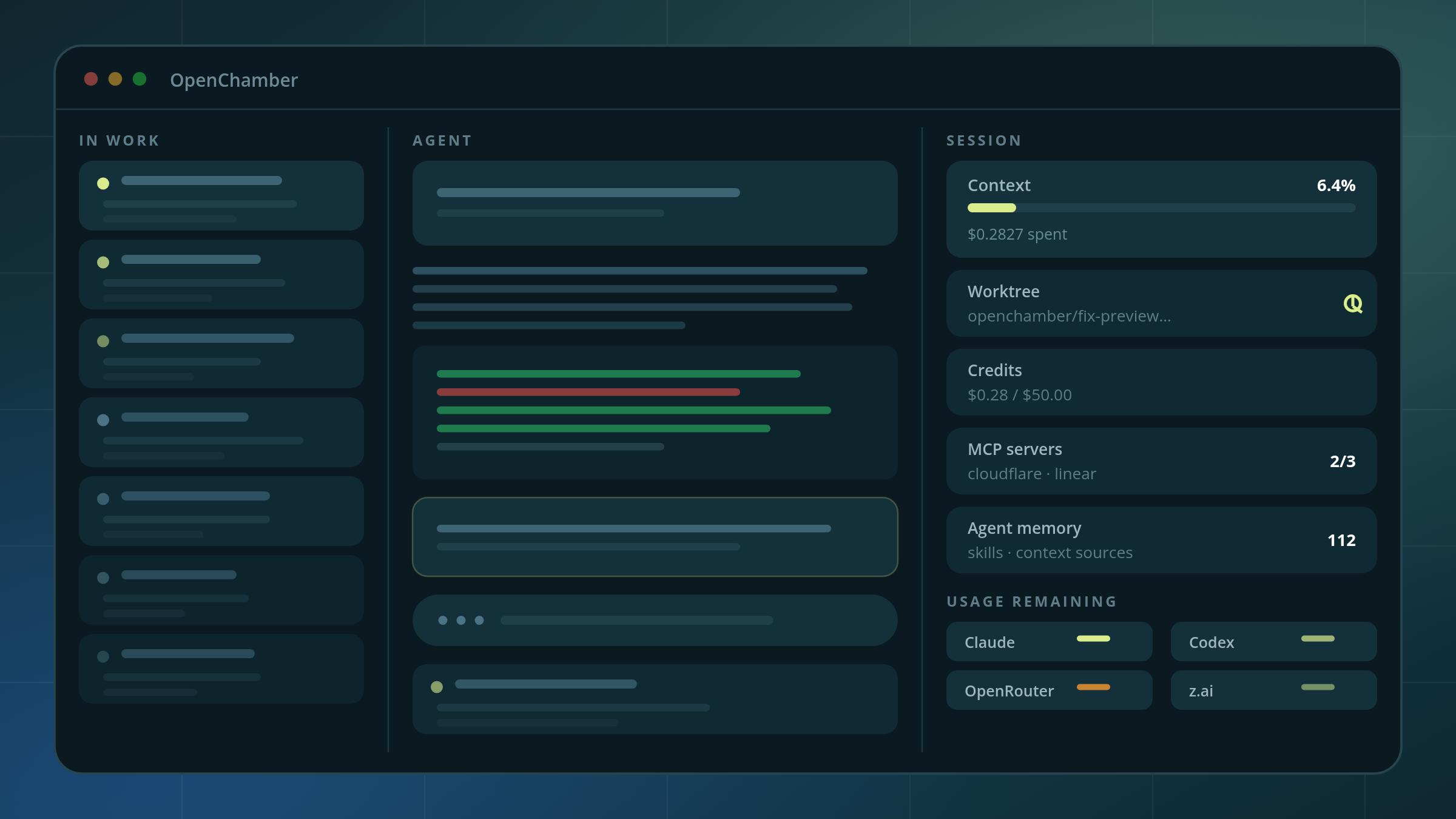
It is not an agent and it is not an editor. It is the layer that lets a solo builder or a small team run five coding agents, five worktrees and five model subscriptions without losing the thread — and it is MIT licensed, so you can read exactly what it does.
I run a publication, a content system and an ops console with a small stack of coding agents. The cockpit I built for myself turned out to be the thing small teams are quietly building too: one place where every agent session is visible, every worktree is bound, and every dollar is counted. This is a spotlight on OpenChamber — what it does, what the research says about the alternatives, and the things it does not do well.
OpenChamber: parallel sessions on the left, live context, spend and quota on the right, and every session bound to the worktree it is running in.
1. The cockpit layer, and why it exists now
Three companies published the same story from opposite ends of the stack this year. OpenAI shipped a product with zero hand-written code — about a million lines, 1,500 pull requests, three engineers at 3.5 PRs per engineer per day — and its engineer's job became designing environments rather than writing code. Anthropic merged 30,000 changes a day and had to rebuild git to survive. Cloudflare open-sourced Void because employees vibe-coding their own apps had become the new shadow IT.
The model stopped being the bottleneck. The environment became the product.
That is where OpenChamber sits, and it is the piece I want to put in front of you. It is not a model. It is not a coding agent. It is the layer that turns agents into something a person or a team can actually operate — and, critically, it is open source, so the claims are checkable.
2. What you are actually looking at
I recorded ninety-one seconds because the screen says more than I can. Here is what I am pointing at, in the order I point at it.
OpenChamber.mp4 — 1m41s. The session rail, the burn rate, the recap, and the worktree lock, in the order I use them.
The session rail on the left
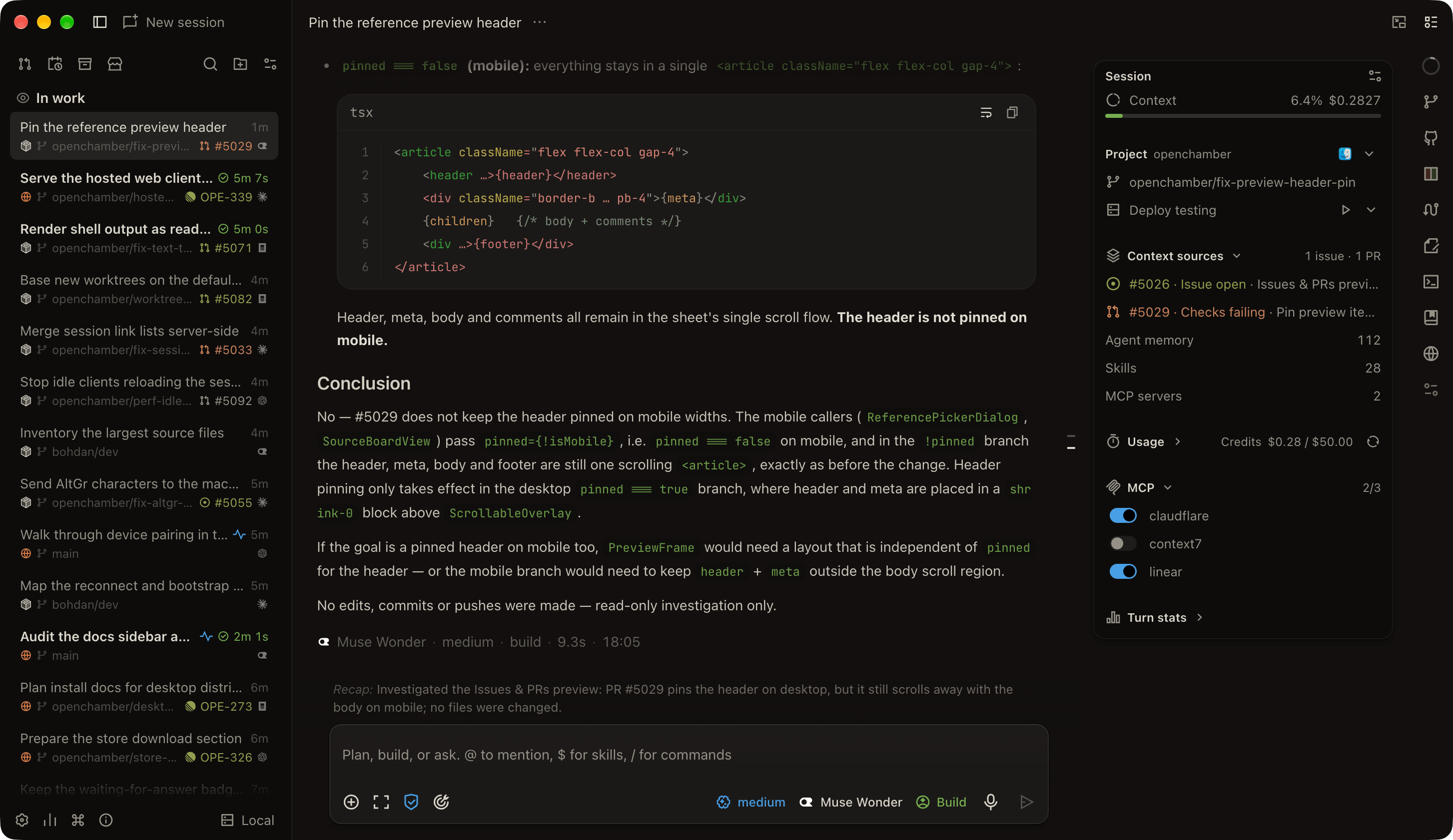
Every running session, stacked, each one labelled with its worktree and branch, its elapsed time, and the ticket it is attached to. In the screenshot below there are thirteen open sessions across three repositories, and I can tell at a glance which one is burning, which one is blocked, and which one is mine. In the video I said it plainly: “this left side here where it shows all the different sessions.” When you run agents in parallel, this rail is not a nicety. It is the difference between a fleet and a pile.
The Session panel on the right: your burn rate, in one glance
This is the part I was most surprised by and now cannot work without. The Session panel shows context percentage (6.4% in this session), dollars spent so far ($0.2827), the worktree the session is bound to, the issue and PR that seeded it, how much agent memory is loaded, how many skills and MCP servers are attached, and how many credits remain ($0.28 of $50.00). My words in the video: “You can see your burn rate, which is pretty helpful.”
Now look at the mobile view of that same data, because this is the one that changed how I work:
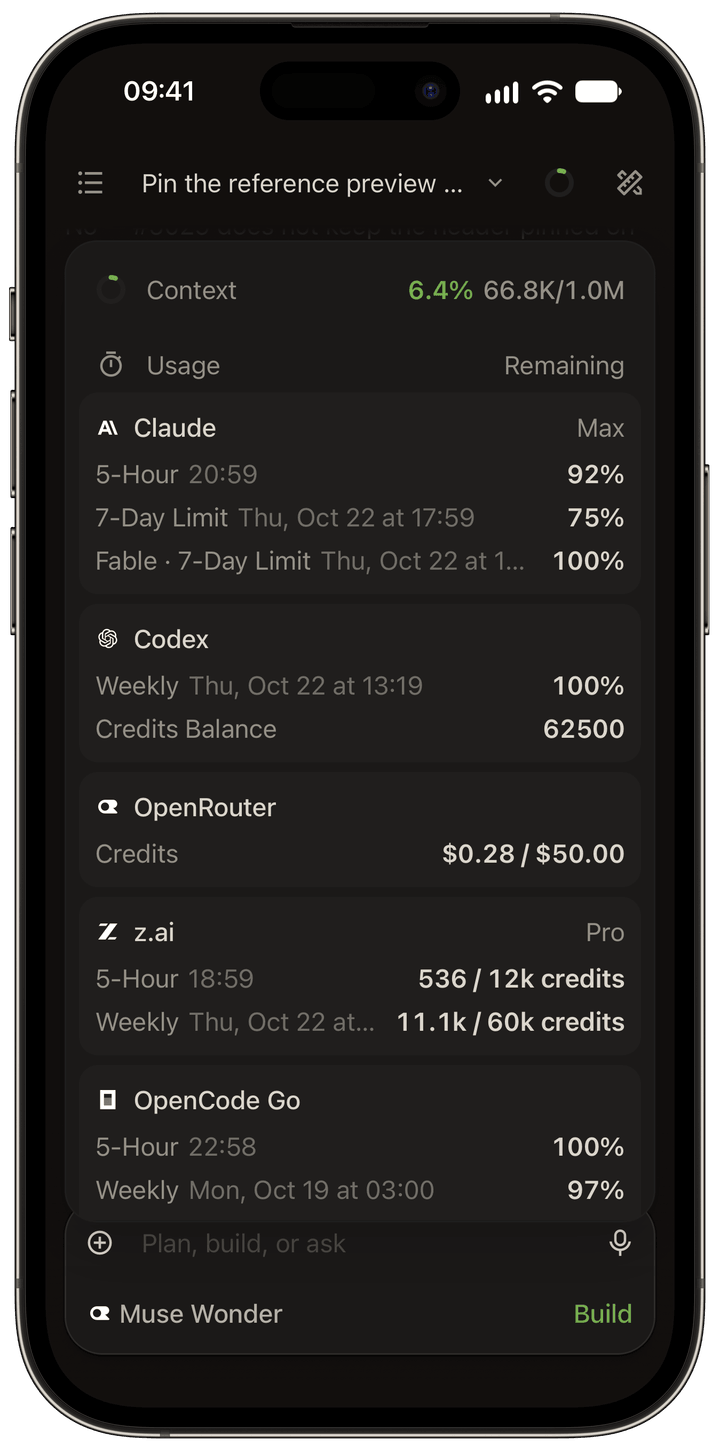
That is not a dashboard. It is a router. It is the answer to the real cost problem of agent work, which is never “the model is too expensive” — it is “I did not know which of my five subscriptions was about to run out until it did.”
The recap, and the next prompt
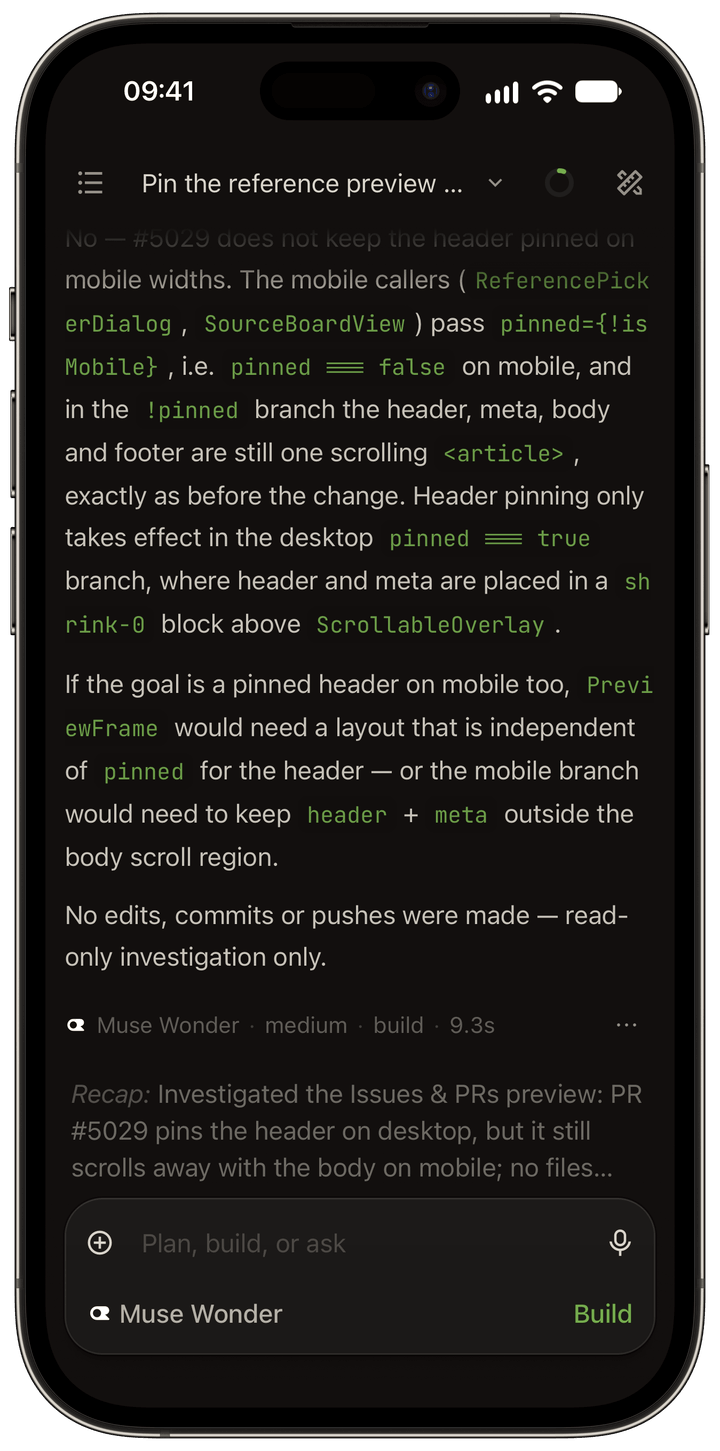
Under every completed turn, OpenChamber writes a recap — one paragraph in plain language about what actually happened. In the screenshot above: “Investigated the Issues & PRs preview: PR #5029 pins the header on desktop, but it still scrolls away with the body on mobile; no files were changed.” That single line is the handoff note, the status update and the audit trail, generated by the thing that did the work. It also suggests what to prompt next. In the video: “It gives me a recap. It gives me other information here. Oftentimes it'll give me a suggestion about what my next prompt should be.”
This matters more than it sounds. A Harvard study covering 300 million work events across 700+ firms found that AI coding agents produced 30% more lines of code, 20% more commits and 23% more pull requests — and the time from PR submission to merge ballooned 49%, with PRs needing changes requested nearly doubling. The bottleneck moved from writing to reading. Any tool that gives you a readable account of what changed is attacking the right problem.
The worktree lock
The feature I would keep if I could only keep one. Each session is bound to the worktree and branch it is running in, and the rail shows that binding on every row. I said it is probably the most valuable piece, and I meant it: “the really kind of locked in way that it attaches to the work tree that you're in.” Two agents can refactor and fix a bug in the same repository at the same time, on separate branches, without either one seeing the other's files. OpenChamber calls this a worktree session, and it can start one from a new branch, an existing branch, or a pull request or issue.
One confession from the video, because it is exactly the class of mistake this prevents: “I mean, really, I shouldn't be working in Maine, but I am.” A session pointed at the wrong worktree. With the binding visible, that is a two-second fix. Without it, it is an afternoon.
Mobile that actually works
My final point in the video was the one I get asked about most: “It also has a great mobile experience that syncs up really well and it just works. A lot of the other agentic coding systems, their mobile apps are just really flaky.” The mechanism is worth knowing: you run OpenChamber on a server you control, and pair a phone by scanning a one-time QR code. The relay is end-to-end encrypted, no port is opened, and the default posture is localhost-only until you deliberately say otherwise. OpenChamber describes its own relay as “a blind courier, not a middleman” — it cannot read your code, your prompts or your passwords. You can self-host the relay too.
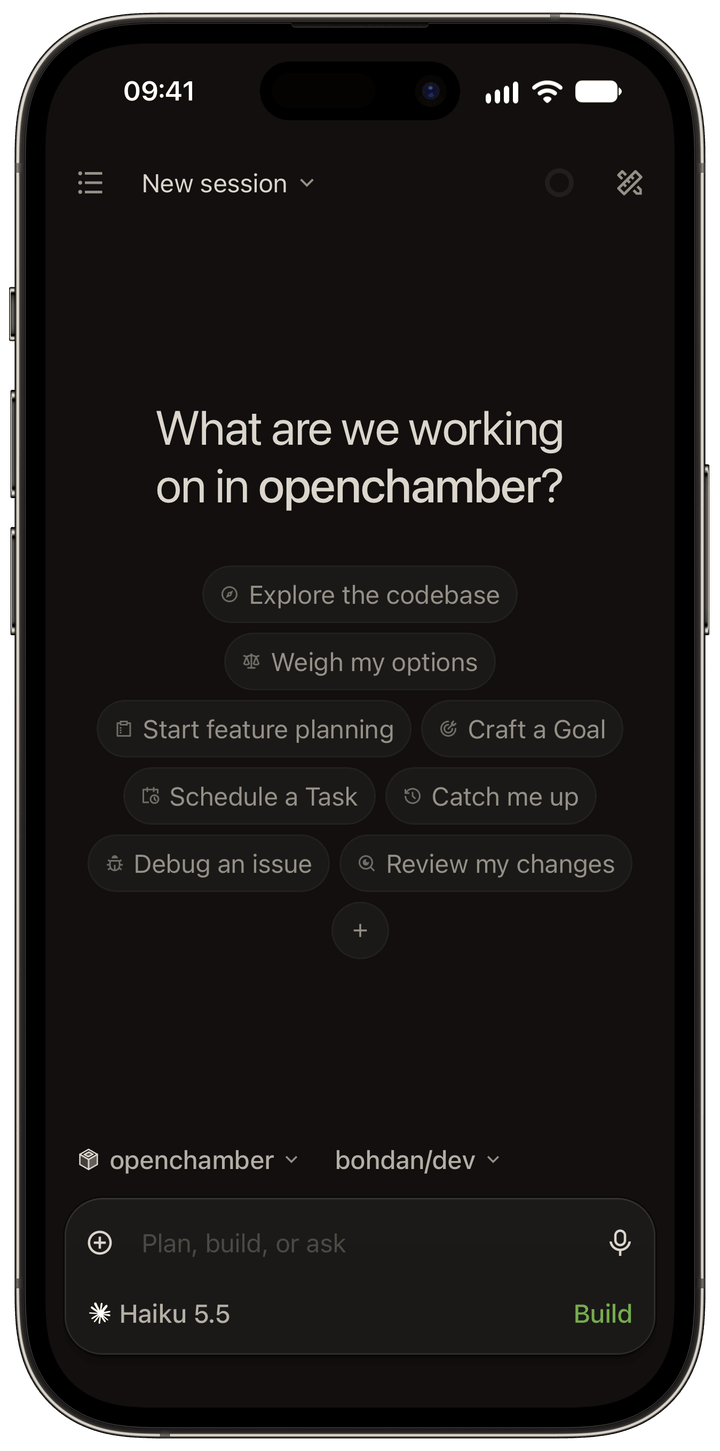
Compare that with the state of the rest of the category. Of the open-source agent workspaces, several carry a GPL or a source-available licence that is not really open source, several are commercial products with no open tier, and several have mobile apps that barely hold a connection. The complaint about “flaky” mobile apps is not nostalgia for a better vendor — it is a description of a category that has not shipped a reliable answer yet.
3. The three layers, and the one nobody is buying
Here is the frame that made this tool make sense to me, and it is the frame the whole industry is quietly converging on.
| Layer | What it is | Examples | What it decides |
|---|---|---|---|
| The model | The thing doing the reasoning | Claude, GPT, Gemini, DeepSeek, Mistral, Qwen, local models | Nothing about your workflow. It is interchangeable by design. |
| The harness | The software around the model that manages tool calls, context, permissions and session state | Claude Code, Codex CLI, OpenCode, Gemini CLI, Aider, Goose, Crush, Amp | Which files it reads, when it asks permission, how it recovers from a failed command, what happens when context runs out. |
| The surface | Where you watch it work | Cursor, Zed, Devin Desktop, VS Code extensions, and the new cockpit layer: OpenChamber, Conductor, Paseo, Orca, T3 Code | Whether you can supervise ten agents, or only one, without losing your place. |
Most buying decisions get made at layer one, and that is the mistake. The harness is where the behaviour lives. The surface is where you find out whether you can actually operate at the speed you are paying for. The 2026 Stack Overflow Developer Survey — 30,000+ respondents across 169 countries — found 83% of developers now use at least one AI tool or agent, 65.9% use AI coding assistants or agents, and 73% of those use them daily, with 30.9% of daily AI users spending four hours or more a day inside them. When the tool is where you spend a third of your working life, “which surface do I look at” is not a cosmetic question.
4. The options, honestly
The cockpit layer is new — roughly eighteen months old — and it split almost immediately into two philosophies. Some commit to one harness and go deep. Some manage many harnesses side by side. Both are legitimate; they fail differently.
| Cockpit | License | Harnesses | Stars | The trade |
|---|---|---|---|---|
| OpenChamber | MIT | OpenCode only | 11.9k | Deepest supervision layer of the open-source cockpits; no harness variety |
| Conductor | Closed | Claude Code, Codex, Cursor, OpenCode | — | Cloud Firecracker sandboxes; $50/mo Pro; proprietary |
| Paseo | Apache-2.0 | Claude Code, Codex, OpenCode, Pi + 25 more via ACP | 21.5k | Best cross-harness and cross-device story |
| Orca | MIT | 25+ CLIs | 99.4k | Most harnesses in one board; young project |
| T3 Code | MIT | Claude Code, Codex, Cursor, Grok Build, OpenCode, Antigravity | 28.8k | Six named integrations, still narrow |
| CodeNomad | MIT | OpenCode only | 2.6k | Same commitment, different ergonomics |
| Superset | Elastic 2.0 (not open source) | 100+ agents | 15.4k | Source-available, not open source; hosted product sunset |
| cmux | GPL-3.0-or-later | Terminal runtime | — | Licence carries commercial restrictions |
Underneath the cockpits, the harness layer is where the big open-source projects live, and it is far more concentrated than the cockpit layer:
| Harness | License | Models | Stars | Note |
|---|---|---|---|---|
| OpenCode | MIT | 75+ providers incl. local | 218.6k | Anomaly; client-server, SDK, plugins, built-in worktree tools |
| Claude Code | Closed | Claude only | 152.8k | Strongest single agent for hard refactors; Anthropic-only by design |
| OpenAI Codex | Apache-2.0 | GPT family | 130.3k | Safer default sandbox; better out of the box |
| Gemini CLI | Apache-2.0 | Gemini | 107.5k | Free tier |
| Goose | Apache-2.0 | 15+ providers | 55.5k | Agentic AI Foundation |
| Aider | Apache-2.0 | BYO | 49.7k | Last pushed May 2026 |
| Crush | FSL-1.1-MIT (not open source) | OpenAI/Anthropic-compatible | 28.7k | Becomes MIT after two years |
| Cline | Apache-2.0 | BYO, 500+ via Kilo | 70.8k | Extension-first |
5. Six reasons this one won
It is a cockpit, and it commits
Multi-harness cockpits hedge. OpenChamber bets everything on one harness — OpenCode — and therefore owns the whole experience. The project’s own README gives the reason: “OpenChamber uses OpenCode to run coding agents. We chose it because it is open source, has a solid API, and is easy to extend.” When the cockpit and the harness move together, the supervision features are not bolted on. They are the product.
It is also honest about the relationship. The docs describe it as “the visual workspace around OpenCode (the AI coding agent that runs in your terminal)”, and the project states plainly that it is an independent project and not affiliated with the OpenCode team. That candour is worth something in a category full of marketing.
It shows you the bill, across every provider you use
Context percentage, dollars spent, credits remaining, and a per-provider quota board covering Claude, Codex, OpenRouter, z.ai and OpenCode Go — on your phone. When you are running five models on five subscriptions, this is the feature that makes model freedom affordable instead of reckless. Composio put it plainly in their July comparison: “Codex is the better default. OpenCode is the better power-user tool.” A power-user tool without a cost readout is a power-user tool that runs out of money.
Worktrees are not a feature. They are the architecture
OpenChamber calls it a worktree session: its own checkout, its own branch, optional per-run isolation in multi-run, and an “Integrate” action that merges the session’s commits back onto another branch, handing conflicts to the agent. One prompt can go to up to five models, each with its own worktree and branch, and you keep the best result or fuse them. That is the parallelism pattern OpenAI shipped internally — their app is bootable per git worktree so Codex can drive one instance per change.
OpenCode itself now exposes worktree primitives at the harness level (worktree_create, worktree_list, worktree_remove, shipped in v2.0.27 on October 12, 2026), which means the pattern is becoming table stakes rather than a differentiator.
It attacks the review bottleneck, not the writing bottleneck
Everyone has solved code generation. The Changes Walkthrough reorders a large diff into the order it actually makes sense, groups related edits into stops, explains each stop in a sentence and marks the key change — because, as the docs put it, “a diff is sorted by file path, which is almost never the order in which the change makes sense.” Combined with the per-turn recap and the session context panel, you are reviewing decisions rather than reconstructing them from a wall of diff.
Goals and schedules: the agent keeps working after you stop watching
A goal turns one prompt into a finish line, and OpenChamber keeps working toward it after every turn, checking progress with an independent auditor model that can say keep going, done, or stuck — and a session only counts as blocked after the auditor says so three times in a row. The loop runs on the OpenChamber server, not in the browser tab. The docs put it better than I can: “Close the tab, lock the phone — the agent keeps working.” Scheduled tasks and portable markdown loops in .agents/loops/ do the same on a cron, and they are off by default so a committed file never starts a job on its own.
Your code stays yours
OpenChamber: “OpenChamber collects nothing about your work. The code is MIT-licensed, so anyone can check.” OpenCode: "OpenCode does not store your code or context data." and “You own all code produced by OpenCode. There are no licensing restrictions or ownership claims.” 75+ providers through Models.dev, including local models via Ollama, LM Studio and vLLM. The harness’s own system prompts are in the public repository and overridable. And with 218,600 stars and 29,100 forks, this is not a hobby project you are betting the company on.
6. What I do not love
A spotlight that only praises is an advertisement. These are the things I would tell you on the call, and they are the reasons to think before you switch.
It is a wrapper, and the first reviewer on Hacker News called that out
The highest-voted criticism of the launch thread was not about features, it was about framing: “Had to scroll all the way to the bottom to see that its a wrapper for OpenCode. This actual functionality should be more explicitly stated, and should be described much sooner IMO.” Fair. If you are coming from Claude Code or Codex and you want the same harness with a nicer screen, there is a real chance you will be disappointed. The honest version: OpenChamber is OpenCode’s cockpit, and it is a good one, but the intelligence is in the harness and the harness is MIT and free." If you are already happy in OpenCode’s terminal, you can keep using it.
A worktree is not a sandbox
This is the mistake I would make if I let you read only this article. Worktrees stop agents from colliding. They do not contain a process. As one commenter put it on Hacker News: “a worktree agent can still read ~/.aws or curl anywhere. So I only reach for a container/VM the moment an agent runs untrusted code or I care about blast radius… Rule of thumb: worktree for ‘don’t let agents collide’, container for ‘don’t let an agent hurt the host’.” Another, blunt as it gets: “A lot of people lean into the VMs but realistically it’s not actually doing a lot of the security work that you need and leaves you wide open to prompt injection/exfiltration attacks.” OpenChamber’s roadmap does list Isolated Workspaces — sessions inside their own container or Kubernetes pod — as in progress. It is not there yet. I run untrusted work in a sandbox; the worktree is for collision, not for containment.
The permission model starts permissive
OpenCode’s permissions are tool rules — ordered allow/deny/ask rules per action and resource — not an operating-system sandbox, and they default open. A reviewer at Alongside put the trade precisely: “Codex has the safer starting point… Its secure default is the deciding factor,” and on OpenCode, “its permissions start from a more permissive position… and its documentation describes tool rules rather than an operating system sandbox. That changes the setup we would accept for work repositories.” If you work on regulated code, you configure this yourself. OpenChamber’s enterprise mode helps — an admin policy file can pin the OpenCode binary, force provider policies, hide skill catalogs, deny web search and fetch, disable external tunnels, and make push notifications content-free.
No default vendor means no default tuning
Of the six harnesses pointed at the same failing-test repository in one 2026 comparison, OpenCode was among the three that ran the test before answering — and the one that showed its work most completely, running the suite, printing the traceback, then reading the source. But the same review noted the cost: “a harness with no default vendor also has no vendor tuning its prompts for you, so getting the best out of it takes more configuration than Claude Code or Codex asks for.” A controlled same-model test in fresh Docker containers — a vendor blog, so treat it as directional rather than settled — found the same split: Claude Code finished in 9m09s with 73 tests, OpenCode in 16m20s with 94 tests. Speed versus thoroughness. You are choosing which one you want.
Smaller, younger, and louder than it needs to be
11,929 stars and 1,329 forks against OpenCode’s 218,623 — real, but an order of magnitude smaller. 160 open issues. A Reddit thread in September carried repeated accusations of astroturfing for a free open-source project, alongside a fair counter-argument that anyone can fork it and there is no moat to leverage. There is also a recurring “it is too cluttered” critique that the founder of the project’s main competitor has publicly agreed with. And the benchmark is thin: on Terminal-Bench 4.0, Codex and Claude Code are statistically tied at the top, and OpenCode has no rows on the board at all. Treat any “X versus Y” chart that flatters a tool as marketing until proven otherwise.
One real friction point with model subscriptions
OpenCode removed its bundled Claude subscription authentication plugin, because Anthropic’s terms prohibit that use. If you were relying on a bundled Claude Pro/Max login, that path is closed and you authenticate through OpenCode’s own provider flow. Not a dealbreaker — but it is exactly the kind of thing you find out after you have already moved your whole workflow.
7. Who it is for
It is for you if…
You run more than one agent at a time and lose track of them. You use more than one model subscription and want to see the remaining quota. You want to review AI output, not just generate it. You need the agent to keep working after you stop watching. You want to read the source before you trust the tool. You want to work away from the desk without tmux.
Skip it if…
You want one agent, one task and nothing else. You need the strongest single agent and will not configure anything. You need guaranteed isolation today — the roadmap is not shipped. You want many harnesses side by side in one window — look at Paseo or Orca. You want a vendor with a support SLA and a security review. You are on regulated code and will not spend a day on permissions.
Solo builders
This is where I come from, so it is the case I know best. One person, several agents, and no second pair of eyes. The session rail is how you keep track of what is running. The burn rate is how you know which subscription is about to run out. The recap is how you know what happened while you were making coffee. The worktree lock is how one agent never wrecks another’s work while you sleep. For a solo operator the cockpit is the management layer, and it is the difference between shipping and tinkering.
Teams
Small teams hit the same wall a different way: you did not run out of agents, you ran out of visibility. Every engineer has their own harness, their own subscriptions, their own half-finished branches, and nothing shared except a chat channel. A cockpit gives the team one place to see every session, every worktree and every diff, and it gives the lead a place to see the burn across the whole project instead of guessing. The things that get harder as you add people — knowing which branch is live, which PR is stale, who is about to hit a limit — are exactly the things the session rail and the quota board answer.
And because both OpenChamber and OpenCode are MIT, a team can self-host the whole stack, pin the harness version, keep the model choice open, and read the code that touches their repository. That matters more the moment a second person is reading the logs with you.
8. The verdict
OpenChamber is not an agent. It does not write better code than Claude Code, and it does not think better than Codex. It is the place where you watch the work happen, and it happens to be MIT licensed, which means you can read every line of it.
Here is the part that connects this to everything else I have been building. For the last two years the argument has been about agents — who has the best one, which harness tops the benchmark, which tool writes the most code. I do not think that is the interesting question any more. The interesting question is what people can ship when the tooling stops being the constraint. And the answer is not a better agent. It is a better control room.
Because the work — building the product, shipping the release, running the deployment, keeping the machine honest — is not one agent writing one file. It is several sessions across several worktrees, each on a different model, each on a different subscription, reviewed by a human who needs to know what changed, what it cost, and what to do next. That is a cockpit problem. OpenChamber and OpenCode solve it for free, in the open, and you can point at the code.
That is the whole thesis of this publication in one tool: AI is not a chat window at the end of your desk. It is a superpower at your fingertips — but only if you build the environment around it properly. The model is the easy part. The cockpit is the work.
| Source | What was used |
|---|---|
| OpenChamber (official) | openchamber.dev, docs.openchamber.dev, github.com/openchamber/openchamber, changelog through v2.5.0 (Oct 19, 2026), and the project's 36-tool guide (Sep 14, 2026) and AI coding complaints study (Sep 21, 2026), both vendor-authored and flagged as such above. |
| OpenCode (official) | opencode.ai and opencode.ai/docs, changelog through v2.1.0 (Oct 20, 2026). |
| Metrics | GitHub stars, forks and licence fields read from the GitHub API on Oct 20, 2026. |
| Independent comparisons | Alongside, “Best AI Coding Agent Harness in 2026” (Oct 4, 2026); ofox, “Best AI Coding Agent Harness” (Aug 11, updated Oct 20, 2026); Composio, “OpenCode vs Codex” (Jul 2, 2026); Firecrawl, “Claude Code vs OpenCode” (Jun 1, 2026); Karl Wirth, Nimbalyst, “Best AI Coding Agents in 2026” (updated Aug 22, 2026). |
| Survey data | 2026 Stack Overflow Developer Survey (published Oct 6, 2026). |
| Review-bottleneck data | Jellyfish aggregated work events, 300M events across 700+ firms, as reported by Ars Technica (Oct 9, 2026). |
| Community criticism | Hacker News thread “OpenChamber: An Agentic Development Environment” (Aug 9, 2026, 190 points / 93 comments) and r/opencodeCLI and r/opencode threads (Sep–Oct 2026). |
| Media | Screenshots reproduced from openchamber.dev. Video: author's own screen recording. |
| Independence | Not affiliated with OpenChamber or Anomaly — this is an independent spotlight and the vendor was not given approval rights over this text. |
Get the next field note
New articles, show notes, and practical lessons from the Strattegys AI crew.
 General
See How AI Changes the Calculus for GTM Strategy
What we learned from a Mirror Teams strategy session about how AI lowers the barriers, increases the speed, and changes the output of go-to-market analysis.
 General
Stop Renting Intelligence. I Built My Own Robot — And Here's the Exact Blueprint.
An autonomous AI agent for under $50 a month: a DigitalOcean droplet, the NanoClaw repo, Windsurf, and the whole blueprint live-streamed, patience included.
 Featured
Stop Throwing Mud at the Wall
A surreal late-night show, 10 PM in Sweden and midday in Texas, where three minds debate how to sell in the age of AI — and who the future belongs to.

Your brand here
Get your founding sponsor spot now.
Become a founding sponsor
Inquire to learn about features, shows, and sponsor placements. No plans, no pricing sheets — just a conversation about fit.