Send Your First Notification from a Docker Container — NTFY Learn
A 15-minute Learn exercise: have an AI agent build a tiny Docker container that sends a real phone notification through ntfy, start to finish.
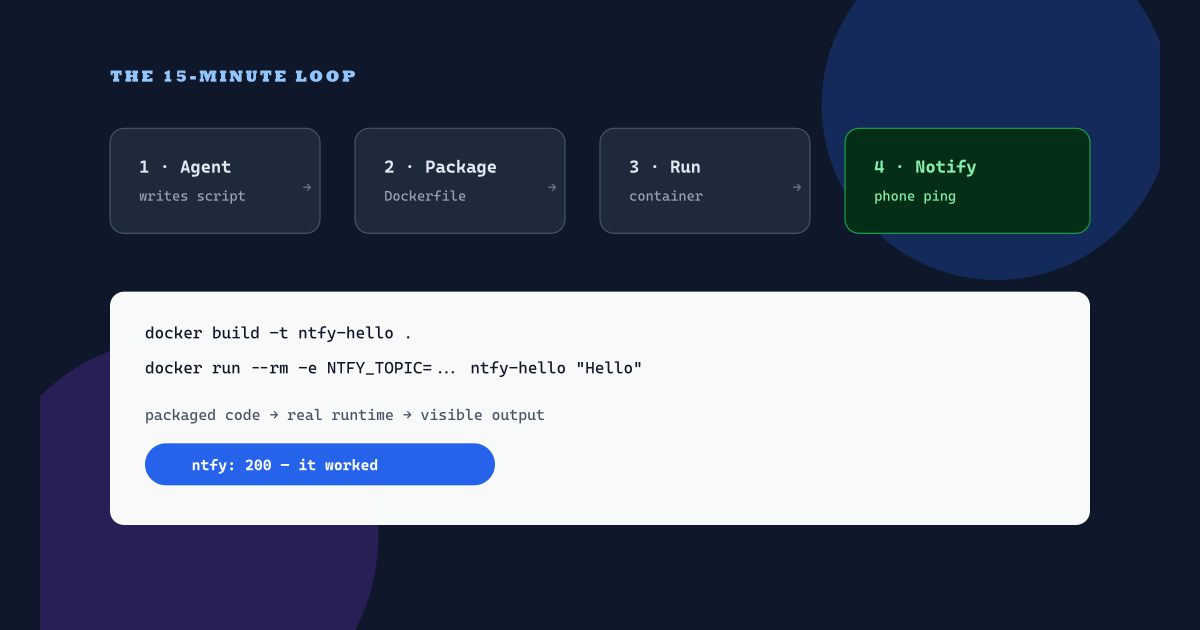
You need: Docker Desktop, a coding agent (Codex works), and optionally the ntfy app on your phone.
The exercise loop: your agent writes the script, Docker packages and runs it, and a real notification on your phone proves the system works.
Why this tiny exercise matters
I run my agents in an OpenCode-based harness with OpenChamber, and the one thing I always want from that system is a ping on my phone when something matters. This exercise is the smallest possible version of that loop.
“A lot of people use Telegram, and I tried that. I’ll be honest with you, I didn’t like it at all — every couple of hours I’d get Telegram spam. All I really want from my agent system is to let me know about things that are important, and I need to get them reliably and consistently, and I need to actually see them. NTFY is just absolutely great.”— Govind Davis, NTFY Intro
1 — Ask the agent to build it
Paste this into your agent:
Build a tiny notifier I can run in Docker.
A Python script, notify.py, that POSTs its first command-line
argument to https://ntfy.sh on a topic from NTFY_TOPIC
(default: strattegys-hello-CHANGEME). Print the response status.
Plus a Dockerfile based on python:3.12-slim that copies the
script and runs it. Keep everything under 30 lines total.strattegys-hello-CHANGEME is a placeholder — swap in something only you would guess before you run anything.2 — Check what it made
You should get something close to this. Read it before you run it — never run agent-written Dockerfiles blind:
import os, sys, urllib.request

topic = os.environ.get("NTFY_TOPIC", "strattegys-hello-CHANGEME")
message = sys.argv[1] if len(sys.argv) > 1 else "Hello from Docker"
req = urllib.request.Request(
    f"https://ntfy.sh/{topic}",
    data=message.encode(),
    headers={"Title": "First container ping"},
    method="POST",
)
with urllib.request.urlopen(req, timeout=15) as res:
    print("ntfy:", res.status)
FROM python:3.12-slim
WORKDIR /app
COPY notify.py .
CMD ["python", "notify.py"]python:3.12-slim), nothing is copied except the script, and the topic comes from the environment — not hard-coded with a real secret.3 — Build and run it
docker build -t ntfy-hello .
docker run --rm -e NTFY_TOPIC=pick-a-secret-topic-name \
  ntfy-hello "Hello from my first container"
Open ntfy.sh/pick-a-secret-topic-name in a browser (or subscribe in the ntfy app) and your message is waiting. That round trip — packaged code, real runtime, visible output — is the whole platform idea in miniature.
Packaging, runtime, and observability: the three platform habits this 15-minute exercise teaches.
Watch where this leads
Once your ping lands, watch the talk to see why this simple pattern matters — agent hooks, priorities that buzz until acknowledged, and notifiers that prove the system is alive.
I’m Govind Davis. I use this with Docker, and my own notifiers started exactly like this one. I set my highest-priority topics so they buzz until I acknowledge them — almost like an Amber alert — because the only alerts I want are the ones I actually see:
“I have a watch — just a really basic Python script. Every hour it checks how my job automation is progressing throughout the day and whether there are any issues. If I stop getting notifications, I know something’s up.”— Govind Davis, NTFY Intro. Watch the video below to see this watch running against my Friday scheduler.
NTFY Intro with Govind Davis — why phone notifications beat chat spam, and the Friday-scheduler watch this exercise is based on.
Bonus — Teach it something useful
Ask the agent to add a disk-space check that notifies you when usage passes 90%. Same container, same pattern, now it earns its keep. Hint for your prompt: ask for shutil.disk_usage("/"), a percentage calculation, and a notify-only-if-over-threshold branch — then rebuild and rerun.
What you just practiced
- Packaging: one Dockerfile turns a script into a portable artifact.
- Runtime: environment variables carry secrets without touching code.
- Observability: a notification is the smallest possible proof the system works.
Next time an agent hands you a bigger build, you will know what to demand: a runnable container, secrets outside the code, and visible proof it ran.
Get the next field note
New articles, show notes, and practical lessons from the Strattegys AI crew.
 Spotlight
The Voice Layer Behind Real AI Production Work
The overlooked input layer behind serious high-volume AI production work: moving intent by voice through Aqua and Wispr Flow instead of typing.
 General
AI Safety Has a Capital Allocation Problem
What a conversation with Anthony Monroy and Aligned Institute reveals about sovereignty, open-source AI, and the infrastructure layer missing from AI risk.
 Featured
Are You Paying Attention to Attention Is All You Need?
Eight Google researchers published one 2017 paper, then quit to build companies from it. Here is what the transformer blueprint means for your business.

LandingRabbit
A website that matches what you sell — built from your ideas, slide decks, and sales notes.
Visit site →Your brand here
Get your founding sponsor spot now.
Become a founding sponsor
Inquire to learn about features, shows, and sponsor placements. No plans, no pricing sheets — just a conversation about fit.